Intro to CliWrap
Leveraging Command Line Tools from .NET Applications
@Tyrrrz | https://tyrrrz.me
What is CliWrap?
📦 https://github.com/Tyrrrz/CliWrap - ⭐ 1.3K - 📥 800K
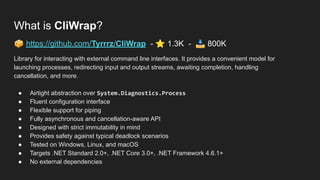
Library for interacting with external command line interfaces. It provides a convenient model for
launching processes, redirecting input and output streams, awaiting completion, handling
cancellation, and more.
● Airtight abstraction over System.Diagnostics.Process
● Fluent configuration interface
● Flexible support for piping
● Fully asynchronous and cancellation-aware API
● Designed with strict immutability in mind
● Provides safety against typical deadlock scenarios
● Tested on Windows, Linux, and macOS
● Targets .NET Standard 2.0+, .NET Core 3.0+, .NET Framework 4.6.1+
● No external dependencies
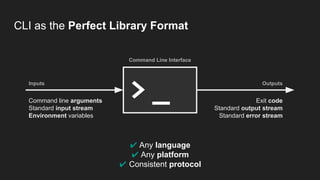
CLI as the Perfect Library Format
Command Line Interface
Inputs Outputs
Command line arguments
Standard input stream
Environment variables
Exit code
Standard output stream
Standard error stream
✔ Any language
✔ Any platform
✔ Consistent protocol
> _
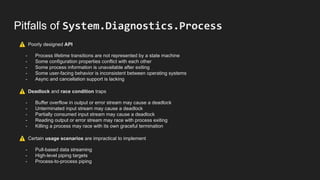
Pitfalls of System.Diagnostics.Process
⚠ Poorly designed API
- Process lifetime transitions are not represented by a state machine
- Some configuration properties conflict with each other
- Some process information is unavailable after exiting
- Some user-facing behavior is inconsistent between operating systems
- Async and cancellation support is lacking
⚠ Deadlock and race condition traps
- Buffer overflow in output or error stream may cause a deadlock
- Unterminated input stream may cause a deadlock
- Partially consumed input stream may cause a deadlock
- Reading output or error stream may race with process exiting
- Killing a process may race with its own graceful termination
⚠ Certain usage scenarios are impractical to implement
- Pull-based data streaming
- High-level piping targets
- Process-to-process piping
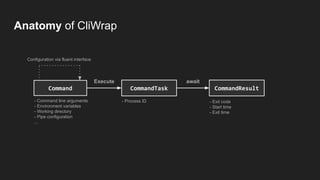
Execute await
CommandResult
Anatomy of CliWrap
Command
Configuration via fluent interface
CommandTask
- Command line arguments
- Environment variables
- Working directory
- Pipe configuration
...
- Process ID - Exit code
- Start time
- Exit time
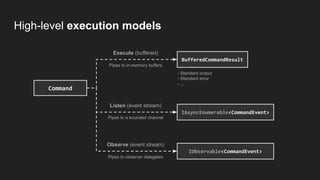
Execute (buffered)
Listen (event stream)
Observe (event stream)
Pipes to in-memory buffers
Pipes to a bounded channel
Pipes to observer delegates
- Standard output
- Standard error
- ...
High-level execution models
BufferedCommandResult
IAsyncEnumerable<CommandEvent>
Command
IObservable<CommandEvent>
Coding time!
Thanks for joining!
Find me online:
@Tyrrrz | https://tyrrrz.me
Learn more about CliWrap:
https://github.com/Tyrrrz/CliWrap
See examples used in this webinar:
https://gist.github.com/Tyrrrz/4cf67feea50cfdbbd871f217a10427c4

Intro to CliWrap

  • 1.
    Intro to CliWrap LeveragingCommand Line Tools from .NET Applications @Tyrrrz | https://tyrrrz.me
  • 2.
    What is CliWrap? 📦https://github.com/Tyrrrz/CliWrap - ⭐ 1.3K - 📥 800K Library for interacting with external command line interfaces. It provides a convenient model for launching processes, redirecting input and output streams, awaiting completion, handling cancellation, and more. ● Airtight abstraction over System.Diagnostics.Process ● Fluent configuration interface ● Flexible support for piping ● Fully asynchronous and cancellation-aware API ● Designed with strict immutability in mind ● Provides safety against typical deadlock scenarios ● Tested on Windows, Linux, and macOS ● Targets .NET Standard 2.0+, .NET Core 3.0+, .NET Framework 4.6.1+ ● No external dependencies
  • 3.
    CLI as thePerfect Library Format Command Line Interface Inputs Outputs Command line arguments Standard input stream Environment variables Exit code Standard output stream Standard error stream ✔ Any language ✔ Any platform ✔ Consistent protocol > _
  • 4.
    Pitfalls of System.Diagnostics.Process ⚠Poorly designed API - Process lifetime transitions are not represented by a state machine - Some configuration properties conflict with each other - Some process information is unavailable after exiting - Some user-facing behavior is inconsistent between operating systems - Async and cancellation support is lacking ⚠ Deadlock and race condition traps - Buffer overflow in output or error stream may cause a deadlock - Unterminated input stream may cause a deadlock - Partially consumed input stream may cause a deadlock - Reading output or error stream may race with process exiting - Killing a process may race with its own graceful termination ⚠ Certain usage scenarios are impractical to implement - Pull-based data streaming - High-level piping targets - Process-to-process piping
  • 5.
    Execute await CommandResult Anatomy ofCliWrap Command Configuration via fluent interface CommandTask - Command line arguments - Environment variables - Working directory - Pipe configuration ... - Process ID - Exit code - Start time - Exit time
  • 6.
    Execute (buffered) Listen (eventstream) Observe (event stream) Pipes to in-memory buffers Pipes to a bounded channel Pipes to observer delegates - Standard output - Standard error - ... High-level execution models BufferedCommandResult IAsyncEnumerable<CommandEvent> Command IObservable<CommandEvent>
  • 7.
  • 8.
    Thanks for joining! Findme online: @Tyrrrz | https://tyrrrz.me Learn more about CliWrap: https://github.com/Tyrrrz/CliWrap See examples used in this webinar: https://gist.github.com/Tyrrrz/4cf67feea50cfdbbd871f217a10427c4